Understanding CPU caching and performance=Re-posted from ars technica
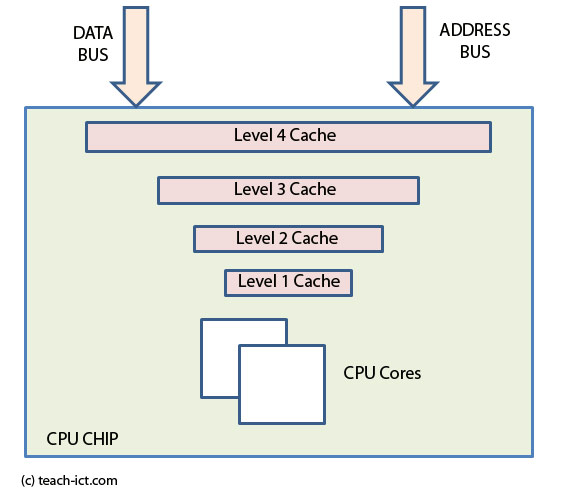
Caching is one of the most important concepts in computer systems. Understanding how caching works is the key to understanding system performance on all levels. On a PC, caching is everywhere. We’ll focus our attention here on CPU-related cache issues; specifically, how code and data are cached for maximum performance. We’ll start at the top and work our way down, stopping just before we get to the RAM.
Feeding the beast
L1, L2, RAM, page files, etc…Why all these caches? The answer is simple: you’ve got to feed the beast if you want it to work. When there’s a large access-time or transfer rate disparity between the producer (the disk or RAM) and the consumer (the CPU), we need caches to speed things along. The CPU needs code and data to crunch, and it needs it now. There are two overriding factors in setting up a caching scheme: cost and speed. Faster storage costs more (add that to the list of things that are certain, along with death and taxes). As you move down the storage hierarchy from on-chip L1 to hard disk swap-file, you’ll notice that access time and latency increase as the cost-per-bit decreases. So we put the fastest, most expensive, and lowest-capacity storage closest to the CPU, and work our way out by adding slower, cheaper, and higher-capacity storage. What you wind up with is a pyramid-shaped caching hierarchy.
So what it all boils down to is this: if the CPU needs something, it checks its fastest cache. If what it needs isn’t there, it checks the next fastest cache. If that’s no good, then it checks the next fastest cache . . . all the way down the storage hierarchy. The trick is to make sure that the data that’s used most often is closest to the top of the hierarchy (in the smallest, fastest, and most expensive cache), and the data that’s used the least often is near the bottom (in the largest, slowest, and cheapest cache).
Most discussions on caching break things down according to issues in cache design, e.g. “cache coherency and consistency”, “caching algorithms”, etc. I’m not going to do that here. If you want to read one of those discussions, then you should buy a good textbook. The approach I’ll take here is to start at the top of the cache hierarchy and work my way down, explaining in as much detail as I can each cache’s role in enhancing system performance. In particular, I’ll focus on how code and data work with and against this caching scheme.
One more thing, I look forward to getting feedback on this article. As always, if I’m out of line, then please feel free to correct me. And as always, leave the ‘tude at the door. We all try to be professional and courteous here; we’ll respect you if you respect us. That having been said, lets get on with the show
First, the registers
The first and most important cache is the on-chip register set. Now, I know you’re not used to thinking of the registers as a cache, but they certainly fit the description. Whenever the ALU (Arithmetic Logic Unit) needs two numbers to crunch and a place to put the results, it uses the registers. These registers are the fastest form of storage on the CPU, and they’re also the most expensive. They’re expensive in terms of the logic it takes to implement them. More registers means more chip real estate, and chip real estate is the priciest real estate there is (with Boston and NYC running second and third respectively). However, having more registers makes parallelizing code easier.
Parallel Power
The beauty of modern superscalar architectures is that they can perform more than one operation at once. Now there’s more than one reason you’d want to do this. Some types of problems can be solved quicker if you break them up into smaller parts and then do all the smaller parts all at once. For instance, say you wanted to find all the prime numbers between 1 and 100. One way to do it would be to start at 1 and check each consecutive integer for primeness until you get to 100. However, there’s a better way to do this if you have the resources: Split the problem up 10 ways among 10 friends. Give each of your 10 friends 10 numbers to check for primeness, and let them all do it at the same time. Assuming all your friends work at the same speed, then you’ll get the answers ten times as fast. That’s parallel processing.
The problem with parallel processing is that only certain types of problems lend themselves to this type of processing. Some problems you just can’t break up. For instance, if you have a string of complex calculations (or decisions), and each calculation (or decision) depends on the one before it for at least one of its inputs, then you can only do those one at a time in sequence. Or can you? Here’s where branch prediction and large register sets come in. What branch prediction does is let you use subsets of registers to execute down multiple branch paths simultaneously. So while you’re waiting for that calculation to finish, you can make a guess as to what its outcome will be and then go on with the sequence using a different register subset while the calculation you were waiting on is still wrapping up. Of course if you guess wrong, then you’ve got to throw out all of those speculative results, which means you’ve just wasted your resources on worthless calculations. Not a good thing. Modern branch prediction algorithms are very good, though, and bad guesses don’t happen often.
When you need data from a register to do a calculation but the data in that register is unstable or is still subject to unfinished calculations, this is called a dependency. Dependencies are bad, and the more registers you have, the easier it is to avoid them. Branch prediction sounds wonderful, but the problem with it is that it takes a lot of logic. Prediction logic must unravel code as it’s running, look for dependencies, and make predictions. Often, that logic could be better used elsewhere. When IA-64 comes out . . . nope, I’d better save that for the next article.
The L1 cache — It’s the code, stupid
I’m not going to talk about write policy, or unified vs. instruction/data caches. These things affect performance, but there are excellent write-ups of them elsewhere. For a good introduction to L1 cache technology, check out the PCGuide.
What I want to discuss here is how code and data interact with the cache to affect performance. For this particular discussion, I’m going to take the Pentium II’s L1 cache as my starting point. The PII’s L1 is split into a 16KB instruction cache and a 16KB data cache. That’s all we need to know about the PII’s L1 to get started.
The L1 cache’s job is to keep the CPU supplied with instructions and the registers supplied with data. Whenever the CPU needs its next instruction, it should be able to look into the L1 cache and find it instantly. When the CPU doesn’t find the instruction in the L1 cache, this event is called a cache miss. The CPU then has to go out to the L2 and hunt down that instruction. If it ain’t in the L2, the CPU goes out to RAM, and so on. The same goes for data.
The ideal caching algorithm knows which bits of code and data will be needed next, and it goes out and gets them. Of course, such an ideal algorithm can’t actually be implemented, so you have to do your best to guess what’s coming up. Modern caching algorithms are pretty good at guessing, generating hit rates of over 90%.
Caching Code
The key to caching instructions is to know what code is being used. Lucky for all of us, code exhibits a property called locality of reference. This phrase is a fancy way of saying that after you execute an instruction, the odds that the next instruction you’ll need to execute is stored somewhere very nearby in memory are damn good. But the type of code you’re running affects those odds. Some code gives better odds on easily finding the next instruction, and some gives worse.
Business Apps
With a business app like MS Word, there are lots of buttons and menus and pretty things to play with on the screen. You could press any one of them at any time, and completely different bits of code from completely different parts of memory would have to be put into the L1. There’s no way of knowing whether the user is going to stop typing and fire up the “insert table wizard”, or the annoying “Office Assistant” (does anybody else hate that thing?), or the drawing tools. Such are the joys of event-driven programming. Now, within a particular menu selection or wizard, there’s a pretty high degree of locality of reference. Lines of code that do related tasks tend to be near each other. But overall, an office program like Word tends to call on code from all over the map. In a situation like this, you can see why the number of L1 cache misses would be pretty high. It’s just tough to predict what code will need to execute next when the user switches tasks so often.
3D Games/Simulation/Image Processing
So now let’s talk about 3D Games like Quake and uh…what’s that other game…Unplayable, Unoriginal, Uncool, Unstable,…oh! Unreal! (I’d blocked it out of my mind.) These games, and any similar program, make very good use of the L1 cache. Why is that? There are a number of reasons, but one thing probably accounts for most of their success: matrices.
Simulations use matrices like you wouldn’t believe. 3D simulations use matrices for a whole host of tasks, including transformation and translation. Translating or transforming a 3D object requires iterating through various matrices. Even other types of simulations like neural networks use matrix math. All a neural net really consists of is a set of matrices describing the weights on connections between neurons, along with input and output vectors. When the network learns, these weights have to be updated, a task which requires you to iterate through the weight matrices.
Image processing programs are also matrix intensive. When an image is loaded into memory, it’s converted into a matrix of RGB values. Histograms, filters, edge detection, and other image processing functions are all done by iterating through the image matrix and changing the values in it. To iterate through a matrix you need lots of loops, and these loops often fit in the L1 cache. So when you’re operating on matrix data you’re using a small amount of code to crunch a large amount of data. The algorithms which this code implements are loop-based and very sequential (those of you who’ve sat through a differential equations course know what I’m talking about). Actually, most numerical methods programming involves highly sequential code which doesn’t jump around too much.
(Ref:https://web.archive.org/web/19990508170711/www.arstechnica.com/cpu/caching.html)


